Put any sound anywhere.
In any room.
3DA Spatial places a sound in 3D and puts it in a real space. Direct sound, wall reflections and reverb are all calculated from geometry, surfaces and air, so distance and space sound right without guesswork.
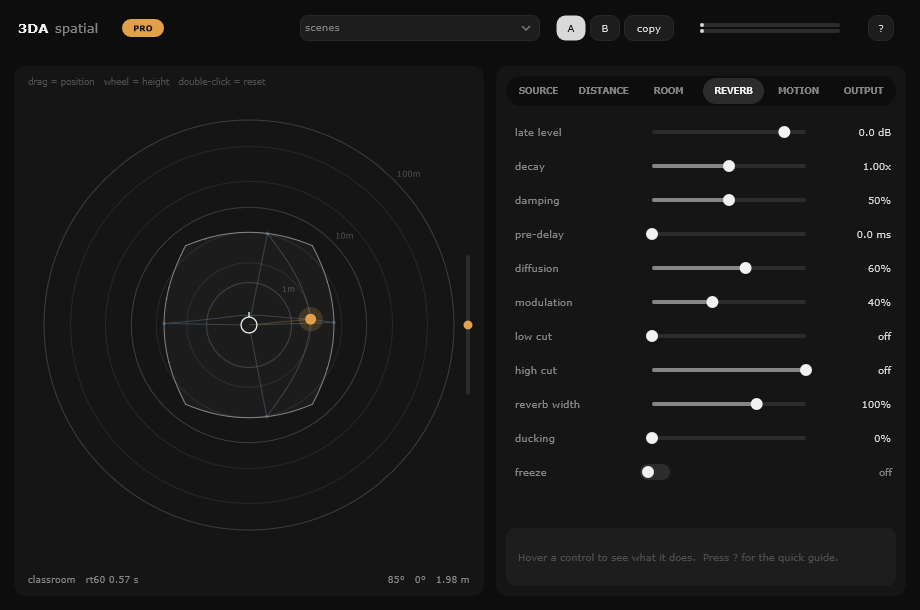
Physics first, knobs second.
Every control maps to something that exists in the real world: metres, materials, degrees, temperature. Set what the scene is, and the sound follows.
Distance you can hear
Inverse-distance level with a reference distance, ISO 9613-1 air absorption from temperature and humidity, a near-field bass boost, and real propagation delay.
Binaural that holds up
Interaural time and level differences from a spherical head model, plus pinna echoes and a shoulder reflection for height and front/back on headphones.
Rooms from real surfaces
31 spaces built from dimensions and materials. Three-band absorption per surface, and 6 or 24 image-source reflections calculated for every bounce.
A reverb that knows the room
RT60 per band from Sabine's formula, a level that follows the room's critical distance, and diffuse-field coherence so the tail feels natural on headphones.
Sources that turn around
Directivity for voices, loudspeakers and horns, with a facing control. Occlusion puts the sound behind a door; obstruction puts something in the way.
Stereo to 7.1
Binaural for headphones, stereo for speakers, and automatic VBAP panning on quad, 5.0, 5.1, 7.0 and 7.1 buses, with a decorrelated surround reverb and an LFE send.
Fast to set, honest to automate.
Drag the dot to place a sound, then pick a room. Every parameter is automatable and glides without clicks, so moving actors and passing cars sound continuous.
- Scenes: 26 starting points, such as Next Room Over, Actor Turns Away, Car Fly-by and Hallway Footsteps
- Stem outputs: print direct only, room only or tail only to their own tracks
- Reference distance: match the original mic distance and keep dialogue at 0 dB
- Ducking: pull the room down under words, and back up in the gaps
- Motion: orbit, fly-by, toward/away, up/down, wander and spiral, with real Doppler
- A/B compare, hover help on every control, and safe migration of older sessions
From a vocal booth to a canyon.
Each room's reverb time comes from its size and surfaces, not from a preset tail. These are the mid-band RT60 values the plugin calculates.
PRO Lite includes the first 8 rooms.
Start free. Unlock everything with Pro.
| Feature | Lite | Pro |
|---|---|---|
| Position, distance, spread, obstruction | ✓ | ✓ |
| Binaural and stereo output | ✓ | ✓ |
| Early reflections and reverb, decay, damping, pre-delay | ✓ | ✓ |
| Rooms | 8 | 31 |
| Wall, floor and ceiling materials | - | ✓ |
| 24 reflections and high-detail HRTF | - | ✓ |
| Directivity, facing, occlusion, sway | - | ✓ |
| Temperature and humidity | - | ✓ |
| Motion paths and Doppler | - | ✓ |
| Ducking, freeze, room EQ, listener position | - | ✓ |
| 5.1 / 7.1 surround with LFE, stem outputs | - | ✓ |
Questions
Which DAWs does it work in?
Any Windows DAW that loads 64-bit VST3 plugins, such as Reaper, Cubase, Nuendo, Studio One, Ableton Live, FL Studio and Bitwig. A standalone app is included too.
Is there a Mac version?
Not yet. 3DA Spatial is Windows 64-bit only for now.
Do I need headphones?
For the binaural mode, yes: it is built for headphones. Switch Render to Stereo for speakers, or use a 5.1 / 7.1 bus with Pro.
How does licensing work?
Lite is free with no time limit. Pro is unlocked with a license key tied to your name. Enter it in the plugin by clicking the LITE badge. It works offline and needs no account.
Will it change my existing sessions?
No. Sessions saved with older versions load and are remapped automatically, and the plugin has a fixed one-sample latency that your DAW compensates for.
Hear it before you install it.
The browser demo runs a simplified version of the room engine. Put on headphones, drag the sound around and switch rooms.